A SMALL EDIT. A NEW RESULT.
Edit PSD text online.
Change editable text layers in supported PSD files, preview the result, and download PNG.
SOURCE FILE 01
Files stay on your device. Conversion, examples and editing previews need no account. Sign in when delivering your own edited PNG.
Loading editor controls. JavaScript is required for local processing.
Your file.
A clear next step.
Open a PSD or try the public example.
Your applied result will appear here.
Your words.
The same template.
- 01 / OPEN
Choose a PSD file.
Use an RGB 8-bit document with a saved composite. Or try the clearly marked public example.
- 02 / EDIT
Select text. Apply your change.
Pick a supported text layer and enter replacement text. Load the original font if requested, then click Apply text.
- 03 / EXPORT
Download PNG.
Check the updated preview before downloading. A draft must be applied first. Undo is available for applied edits.
Need a walkthrough? Follow the poster text-editing guide.
Change a date.
Update a price.
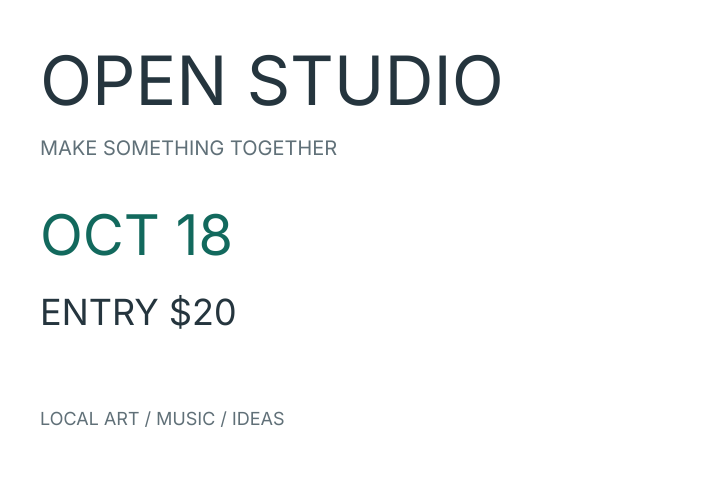
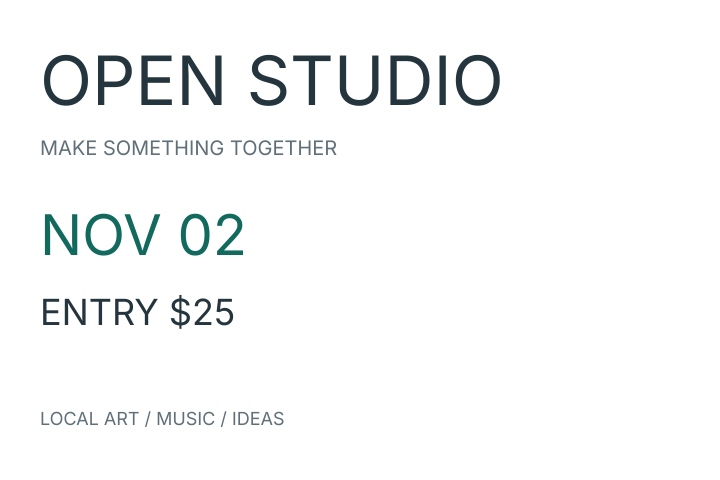
Download example PSDOriginal PNGEdited PNGSample license & font source
Created for PSDFlow with the bundled Inter font. The checkerboard is a display aid, not part of the PNG. Preview other documents carefully; text reflow and effects can differ.
Before you export.
Can I edit any text in a PSD?
Only visible, editable horizontal text layers without warping or mixed styles. Rasterized words and text nested inside smart objects cannot be changed here.
Why does the tool ask for a font?
To preserve the intended font, the tool checks the original font and your new characters. Load a valid matching TTF or OTF from your device. A different font does not satisfy this requirement.
Will the text look exactly like Photoshop?
Text is laid out again after an edit. Antialiasing, paragraph wrapping, and layer effects can differ. Inspect the preview. Undo keeps up to 50 recent steps; Restore original clears all edits and drafts and recovers the saved composite.
Can I download an edited PSD?
No. The result is PNG. Your original PSD is unchanged. Use a full editor when the deliverable must remain an editable PSD.
What size and formats can I use?
RGB 8-bit PSD up to 50 MiB and 8 million canvas pixels. Editing also has a 50-layer and 32-million combined layer-pixel budget. Font files are limited to 20 MiB.
What if no editable text is found?
The text may be pixels, hidden, or nested in a smart object. Read the text troubleshooting guide below to identify the right next step.
Only need the saved image? Convert PSD to PNG.
Missing fonts or no editable text? Diagnose why PSD text is not editable.
Powered by the PhotoCraft open-source core. PSDFlow is an independent tool with its own narrower support limits. Compare PhotoCraft and Photoshop, see our PSD tests, and find the official editor.
HELP WITH YOUR FILE