PhotoCraft vs Photoshop comes down to the editing tools you need, what they cost, and how well they handle your PSD files. PhotoCraft is a free, open-source editor for Windows, macOS and Linux, with a self-hosted Web build. Photoshop offers an established subscription editor and creative ecosystem.
For Photoshop users, the interesting question is where that freedom helps—and where a mature production workflow still matters. This comparison covers the complete PhotoCraft editor and Photoshop, followed by our separate tests of the PhotoCraft core inside PSDFlow.
Official PhotoCraft and downloads · Source on GitHub · Photoshop plans
Is PhotoCraft a Photoshop alternative?
PhotoCraft is an option when free licensing, Linux support or control over the source matters. It is an early-alpha project: check your own documents before replacing a production workflow. We have not established feature or rendering parity with Photoshop.
Keep Photoshop when your work depends on its document behavior, plugins, Camera Raw or generative tools. Our 21 PSD tests use the PhotoCraft core inside PSDFlow, rather than a head-to-head benchmark of the complete editors. The examples below show both successful output and visible text-rendering differences.
Only need a quick browser task? Convert a PSD to PNG or edit supported PSD text and export PNG. PSDFlow is independent of the official PhotoCraft editor and does not save edited PSD files.
A different relationship with your editor
PhotoCraft provides free desktop builds for Windows, macOS and Linux, and a Web build you can host yourself. Its MIT or Apache-2.0 source license gives developers room to fix a bug, pin a version, build an internal workflow or make a smaller interface for a specific task.
PSDFlow is one example: we use the open-source core for two browser tasks, converting a PSD to PNG and editing supported PSD text before PNG export. We are an independent project, not the official editor or its download service.
Photoshop provides plugins, scripts and a long-established creative ecosystem. PhotoCraft opens the editor itself. The choice involves both control over the software and compatibility with the work you actually deliver.
Cost: editor fees and contract terms
PhotoCraft desktop and Web builds are offered free. Hosting, fonts and any other services you choose have their own costs.
The following is the U.S. individual Photoshop single-app price record from our 10 October 2026 research, rather than a live checkout quote:
| Plan | Photoshop price record | PhotoCraft editor |
|---|---|---|
| Monthly, without an annual contract | US$34.99/month | Free |
| Annual, billed monthly | US$22.99/month; US$275.88 across the year | Free |
| Annual, prepaid | US$263.88/year | Free |
The Photography annual plan was recorded separately at US$19.99/month. Annual billing by month still means an annual commitment. Adobe offers different bundles and regional prices; check the current plans and cancellation terms for your country before purchasing.
Linux, local work and a Web build you control
PhotoCraft offers a native Linux option alongside Windows and macOS. Photoshop desktop officially targets Windows and macOS. That platform difference can decide whether a particular editor fits your environment before any feature comparison begins.
PhotoCraft’s self-hosted Web build processes editing and export on the visitor’s device. Photoshop also offers a subscription Web editor with cloud documents and local download. Photoshop desktop can save local files and work offline between required license checks. Choose according to the document workflow and actual network behavior—not a blanket assumption that either product always uploads everything.
Twenty dimensions of the complete editors
This table describes documented capabilities and the practical questions to test. The presence of a feature does not establish equal rendering quality or file compatibility.
| Dimension | PhotoCraft complete editor | Photoshop | What to check in your workflow |
|---|---|---|---|
| Layers and groups | Groups, adjustment layers, blending and layer effects | Established layer-editing workflows | Group structure, blending and final composite |
| Masks and selections | Pixel/vector masks and selection tools | Extensive selection and mask tools | Hair, feathering and translucent edges |
| Brushes and pen input | Brush system and platform pressure-input implementations | Brush and supported-device workflows | Pressure, tilt and long-stroke response |
| Adjustments and filters | Adjustment layers, filters and previews | Adjustment layers, filters and smart filters | Parameters, responsiveness and reversibility |
| Smart objects | Embedded content and smart operations | Embedded/linked objects and nondestructive editing | Replacement, nesting and repeated saves |
| PSD and PSB | Independent parsing and writing with preserved file blocks | Native document formats | Opening, editing and round-trip delivery |
| Bit depth and color modes | 8/16/32-bit and multiple color modes | Professional color modes and bit-depth workflows | Operations available in each mode |
| ICC and color | ICC handling, rendering intent and display conversion | Profile management and conversion workflows | Preview, output and target-device color |
| Text and typography | Point/box text, style runs, shaping and wrapping | Character/paragraph controls, vertical text and OpenType | Original fonts, tracking and line wrapping |
| Vectors and paths | Paths, shapes and vector editing | Paths and shape editing | Nodes, fills, strokes and combined shapes |
| RAW | DNG, CR2 and selected camera decoders; preview fallback for some formats | Camera Raw adjustments and smart objects | Actual decoding, calibration and your camera |
| Generative AI | Generative images and expansion on the roadmap; traditional content-aware tools and agent interfaces | Generative Fill/Expand and cloud features | Whether your task requires generation |
| Plugins | Sandboxed WASM filter plugins | Established Photoshop extension ecosystem | Your existing .8BF, CEP or UXP dependencies |
| Automation | Commands, batch operations, actions and agent interfaces | Actions, batch, Droplets, scripts and plugins | Failure recovery and integration effort |
| Web | Self-hostable static Web build and client-side editing | Subscription Web editor and cloud documents | Deployment, fonts and save behavior |
| Local and offline | Local editing and client-side processing | Local documents and offline editing with periodic validation | Offline duration and license requirements |
| Privacy and deployment | Inspectable source and self-hosting | Local and cloud workflows available separately | Actual requests and document location |
| Performance | Native architecture and GPU canvas | Desktop architecture and GPU acceleration | Same-machine, same-document measurements |
| Stability and recovery | Early alpha; desktop/Web recovery differs | Mature production workflows and recovery tools | Long sessions, interruptions and large files |
| Learning and delivery | Familiar-style UI and a growing open ecosystem | Existing habits, assets and client workflows | Training, plugins and customer PSD requirements |
PhotoCraft’s command, CLI, JSON-control and MCP interfaces are particularly interesting for developers. Photoshop’s mature actions, scripts and plugins remain relevant when a team already depends on them. We have not measured either editor’s complete automation or performance against the other on the same machine.
Our 21-file PSD tests: a separate practical case
We integrated a fixed PhotoCraft core into PSDFlow and tested public Photoshop-authored fixtures and psd-tools samples. These are core-adapter results, not a full editor-versus-editor benchmark.
| Test | Result in this sample set |
|---|---|
| PSD to PNG | 18 RGB/8-bit files converted with decoded pixels matching saved composites |
| 32-bit documents | 3 stopped at PSDFlow’s current format boundary |
| Text edits | 9 text samples completed font loading, editing and undo |
| Complex text | 4 mixed-style, vertical or warped samples produced explicit limitations |
| ICC profiles | 5 profiles preserved; tested Chrome display matched the LittleCMS premultiplied-pixel reference |
| Complete undo | Restored the original saved composite |
| Source files | Original PSD hashes stayed unchanged |
| Network and errors | No file-upload requests or uncaught browser errors in the test record |
A saved image, ready to share
Conversion uses the PSD’s saved composite. It does not rebuild every layer. All 18 supported samples matched their composite references, with 16 opaque samples also checked against independent Pillow decoding.
Try a transparent PSD and download its PNG. Existing transparency is kept; a white background layer is not removed.
Change a date and a price
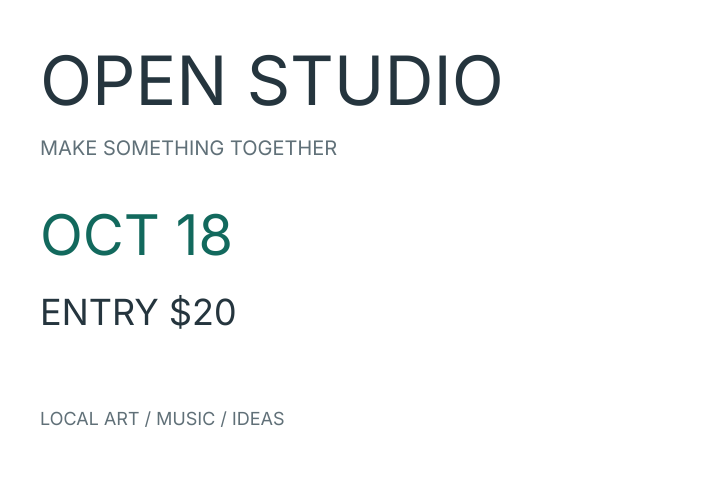
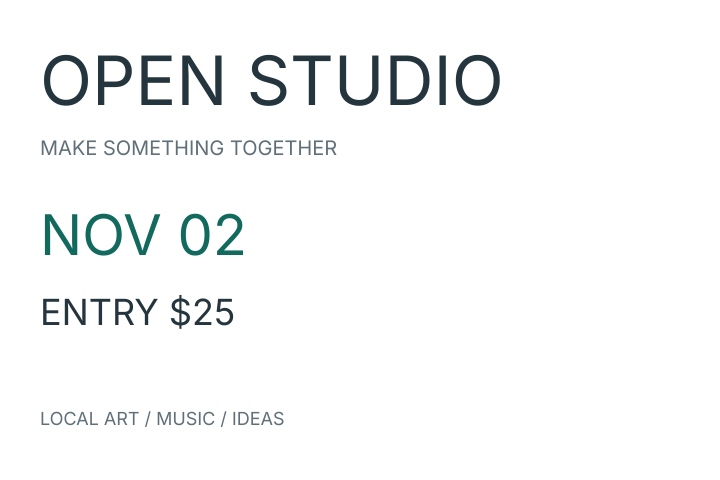
Our self-authored poster is a small reproducible example with separate Inter text layers. Change OCT 18 → NOV 02 and ENTRY $20 → ENTRY $25, then inspect the exported image.
Open the PSD text editor · Follow the full editing guide · Download the poster PSD
The original-font requirement protects against silently substituting another font. If the font or a new character is unavailable, the tool asks you to resolve it before applying the edit.
Paragraph wrapping and effects: see the difference
Three paragraph fixtures changed automatic wrapping when redrawn. Their full-canvas pixel difference above 2/255 was approximately 15.12%–15.99%. The effects-text fixture differed by approximately 17.59%. The comparison below redraws the original text with the original font, isolating the reflow difference from a changed message.
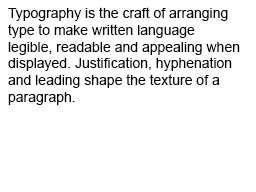
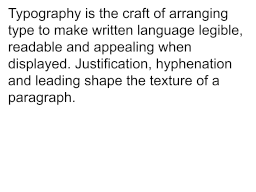
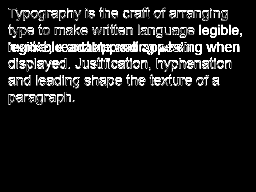
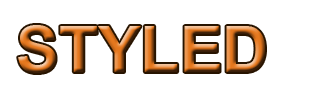
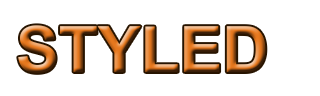

These samples explain why a successful edit still needs a visual check. For pixel-sensitive typography, complex effects or editable PSD delivery, continue in the editor that meets the job’s requirements.
Which should you choose?
Try PhotoCraft when free licensing, Linux, inspectable code, self-hosting or integration matter—and test your own documents before moving a production workflow. It is an early-alpha project.
Keep Photoshop in a workflow that depends on its precise document behavior, specific plugins, Camera Raw, generative tools or client delivery requirements. We have not established complete replacement parity.
Use PSDFlow when your next step is small: convert a supported PSD to PNG, or change supported text and export PNG. It does not save edited PSD, replace objects or provide a complete editor.
Convert a PSD to PNG · Edit PSD text & export PNG · Get the complete PhotoCraft editor
Questions about PhotoCraft
Is PhotoCraft free? The official desktop and Web builds are free; source is MIT or Apache-2.0 licensed. Other services and fonts have their own terms.
Where are the download and GitHub links? Use the official product page for current platform downloads and official repository for source and releases.
Can it open PSD and PSB? The complete editor includes parsers and writers. PSDFlow’s narrower browser tool accepts supported PSD and exports PNG.
Does it run Photoshop plugins? PhotoCraft has its own WASM filter-plugin mechanism. Existing Photoshop plugins still require their corresponding host environment.
Is PSDFlow official PhotoCraft? No. PSDFlow is an independent browser tool using a fixed version of the open-source core.
Sources, versions and test method · 10 October 2026
Feature information comes from official documentation and source; test results come from our separate core integration. The website currently lists a 0.5.0 release, while our tested core is fixed at commit 7b3ded0f8bec6c801c9cd95311602e077ca891af (0.6.0). Those versions are not interchangeable evidence.
Our original test record used macOS, Chrome 154.0.8037.98 and a local static build. PNG comparisons use decoded pixels; paragraph/effects differences compare the saved Photoshop composite with same-text core redraws. Difference images amplify absolute channel values four times, without providing an editor score.
The Photoshop-authored corpus is fixed at f5b1178cab15309e05b7b504545df3c701f6d8fd; the psd-tools corpus at 96eb134c17b2c65edf4c4151c0f00b802ada86c2. Sample licenses and exact image sources. Proprietary system fonts used in tests are not redistributed.
PhotoCraft sources: overview, PSD/PSB, text, color, RAW, plugins, Web deployment, control protocol, roadmap.
Adobe sources: plans, system requirements, supported files, bit depth, ICC, Camera Raw, AI, offline use, Web FAQ.
Full desktop-versus-desktop and Web-versus-Web benchmarks are still pending. We have not scored relative speed, brush latency, RAW color, large-document recovery, PSD round-trip fidelity or production-plugin parity.